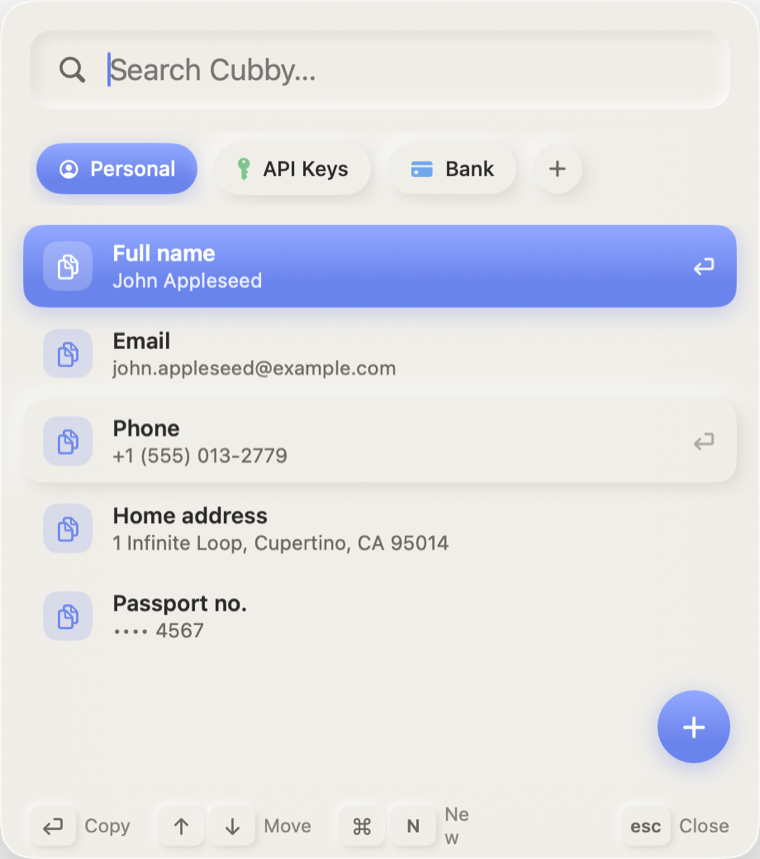
Other tools give you a time-ordered history to scroll through. Cubby gives you compartments you own — instantly recallable, beautifully organized.
🗂️
Named compartments
Group everything into cubbies you name — "Personal", "API Keys", "Bank". Your mental model, made real.
⌨️
Instant hotkey recall
Press ⌘⇧Space from anywhere. Type to filter, ↑↓ to pick, return to copy. It's gone before you blink.
✨
AI smart find
Search by meaning, on-device. Type "my bank number" and the right entry floats to the top — no exact words needed.
🪄
Auto-organize on paste
Paste a Stripe key, a PAN, a card number — Cubby recognizes it, files it in the right cubby, and marks it secret.
🔐
Keychain-backed secrets
Sensitive values live in the macOS Keychain, masked until you reveal them. Copy without ever showing them.
🛡️
Nothing leaves your Mac
No accounts, no servers, no telemetry. Everything — including the AI — runs entirely on your device.
🖱️
Add to Cubby from anywhere
Select text in any app, right-click → Services → Add to Cubby. A compartment picker pops up at your cursor. Never open the panel.
⚡
Per-compartment hotkeys
Give any cubby its own global shortcut. Press it anywhere and its top entry lands on your clipboard — no window, just a pill from the notch.
🕘
Clipboard recents
Opt-in history of your last 20 copies. Grab something you forgot to file and drop it into a cubby. On-device — your secrets are never recorded.
⏱️
Auto-clear timers
Set a per-compartment timer so sensitive values wipe themselves off the clipboard seconds after you copy them.